For those looking to create videos for an audience, adding music to your videography abilities is crucial. Music has the unique ability to alter the mood of your video entirely. From an uptempo beat to a gloomy ballad, the music included in your video changes how your audience is going to experience your creation.
For my video edits, I always edit to music. Although I have experimented using voice-overs in my edits in the past, the one thing that has remained constant in all of my videos is my use of background music.
With music ranging from trap remixes to downtempo piano, music choice can make or break your videos.
For example, in the video included below, I used music, in addition to a voice over, to control how my audience would view the video. The video, a summarization of a friend and family trip to St. Petersburg, Florida, aimed to highlight the weekend as well as the importance of going with the flow. In order to illustrate this through the video, I was very selective when it came to choosing the song I edited to as well as the voice over.
When it came to the voice over, I knew I wanted something inspirational and fitting. Because of this, I searched various Alan Watts lectures and found one with a clip perfect for my edit. In addition to the voice over, I chose the song Spirits by The Strumbellas (the karaoke version) because of how the song builds up on its own and its simplicity.
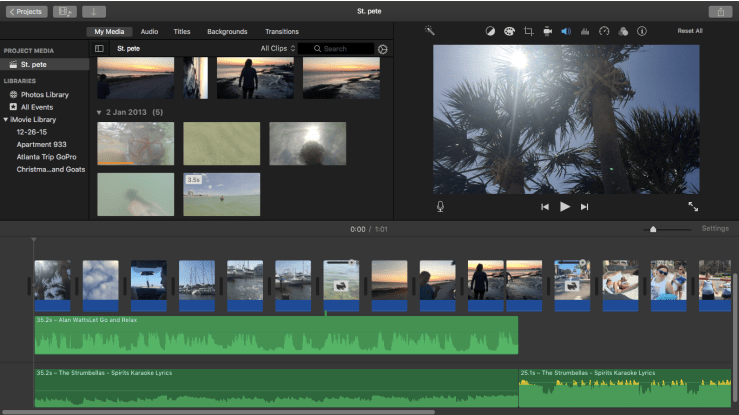
In editing this video, I placed the voice-over on top of the song at the softer part of the song and matched the end of Watts’ lecture to when the beat slightly dropped in the song. To ensure the voice-over could be heard in addition to the music, I split the music clip where I wanted the voice-over to end and before the split, I lowered the volume of the music and increased the volume of the voice over. Once the voice-over ended, I increased the volume of the song to create a larger impact on those watching in order to make the transition from voice-over to song seem like the climax of the video.
It might seem as adding a voice-over on top of a song would mess up your video editing timeline; however, in the iMovie editing software, it did not complicate my editing process at all. Below is a screenshot of what my timeline in iMovie looked like while editing the video found above.
If you have any favorite songs you would like to see in a video edit, comment them below!

 Logan White